AI Chat Showcase: Diagnosing a Clock Synchronization Anomaly in a TSN Network
This walkthrough demonstrates the AI Chat Assistant tackling a subtle
timing anomaly in an IEEE 802.1AS (gPTP) clock synchronization simulation.
The user observes that the switch’s neighborRateRatio — a value that
should reflect only the configured oscillator drift — deviates slightly
from the expected value. The AI systematically investigates the gPTP
protocol state, consults external documentation, runs C++ calculations
inside the simulation, and ultimately identifies a non-obvious coupling
between the clock servo’s oscillator reset mechanism and the
free-running clock used for peer delay measurements.
Note: The results you receive are highly dependent on the LLM provider and model you are using. The results shown in this demo are based on the Claude Opus 4.6 model.
Setup
We launch the INET showcase inside opp_sandbox so that the AI
assistant’s execute_cpp tool (JIT C++ interpreter) is available:
cd showcases/tsn/timesynchronization/gptp
opp_sandbox -m $INET_ROOT -- `inet_dbg -p`
Note: The
-m $INET_ROOTflag mounts the INET installation directory into the sandbox (needed for headers and libraries), and`inet_dbg -p`expands to the necessary include paths for the C++ interpreter. Withoutopp_sandbox, the C++ interpreter is automatically disabled for safety.
After selecting the OneMasterClock configuration in Qtenv, we configure the LLM provider in Edit → Preferences → AI Chat and open the chat window from Inspect → AI Chat Assistant.
Background: gPTP Terminology
IEEE 802.1AS (gPTP) is the time synchronization protocol used in TSN networks. A few key concepts are needed to follow this showcase:
- Oscillator and clock drift. Each network device has a local oscillator that drives its clock. Real oscillators are never perfectly accurate — they run slightly faster or slower than nominal, expressed in parts per million (ppm). A drift of +100 ppm means the clock gains ~100 µs per second.
- neighborRateRatio. A value computed by gPTP that measures how fast a neighbor’s clock runs relative to the local clock. It is derived from periodic peer delay (Pdelay) message exchanges between adjacent nodes. For a node with +100 ppm drift relative to its neighbor, the expected value is 0.9999.
- SettableClock vs. free-running clock. INET models two clock layers: the SettableClock (adjusted by synchronization) and the underlying OscillatorBasedClock (free-running, affected only by drift). The gPTP module deliberately uses the free-running clock for Pdelay timestamping to avoid circular interference with synchronization.
- Clock servo. The component that adjusts the synchronized clock based on gPTP measurements. The StepClockServo applies immediate corrections and can optionally reset the oscillator’s phase at each adjustment.
The Scenario
The simulation is INET’s gPTP time synchronization showcase (OneMasterClock
configuration) — a small TSN
network with a master clock (tsnClock), a bridge (tsnSwitch), and two
slave devices. The switch’s oscillator has a configured drift of +100 ppm;
all other oscillators have zero drift. The gPTP protocol synchronizes the
switch’s clock to the master, and as part of this process computes the
neighborRateRatio.
To isolate the issue, the default parameterization of this showcase
has been simplified. The original
configuration uses RandomDriftOscillator with varying drift rates,
which would make the anomaly hard to spot. The modified omnetpp.ini
replaces all oscillators with
ConstantDriftOscillator, sets the switch’s drift to exactly +100 ppm,
and sets all other oscillators to 0 ppm:
# Original: random drift oscillators with varying rates
**.tsnClock*.clock.oscillator.typename = "RandomDriftOscillator"
**.oscillator.driftRate = uniform(-100ppm, 100ppm)
**.oscillator.driftRateChange = uniform(-1ppm, 1ppm)
was changed to:
# Modified: deterministic constant drift, only on the switch
**.oscillator.typename = "ConstantDriftOscillator"
**.tsnSwitch.clock.oscillator.driftRate = 100ppm
**.oscillator.driftRate = 0ppm
With this setup, the user expects the switch’s neighborRateRatio to be
exactly 0.9999 (corresponding to the 100 ppm drift), but observes
0.999900067 instead — a ~67 ppb discrepancy. Something is interfering.
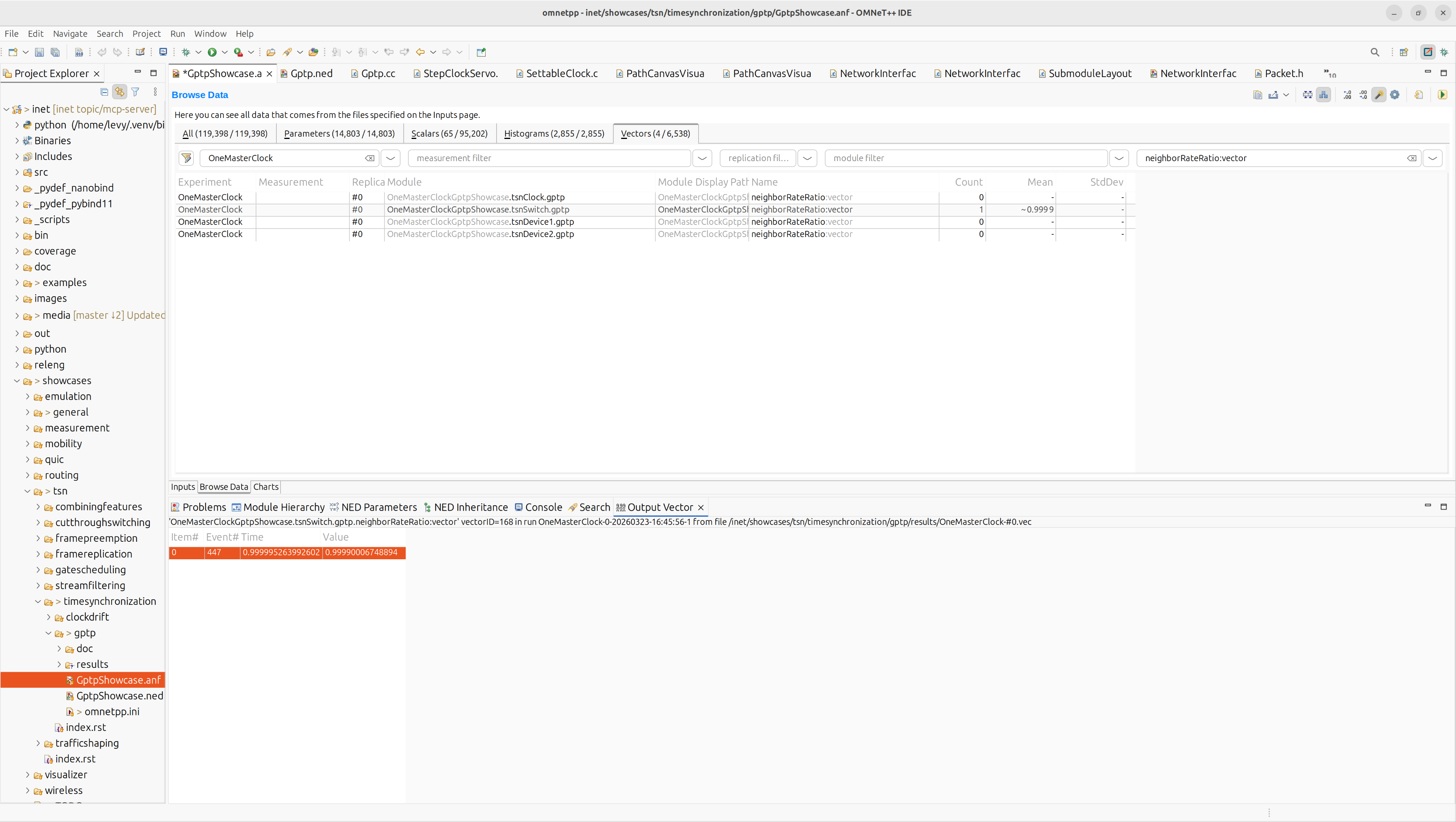
After running the simulation, the user opens the Browse Data tab in
the OMNeT++ IDE and filters for the neighborRateRatio result vector.
The recorded mean value is clearly not the expected −100 ppm — this is
the observation that triggers the investigation:
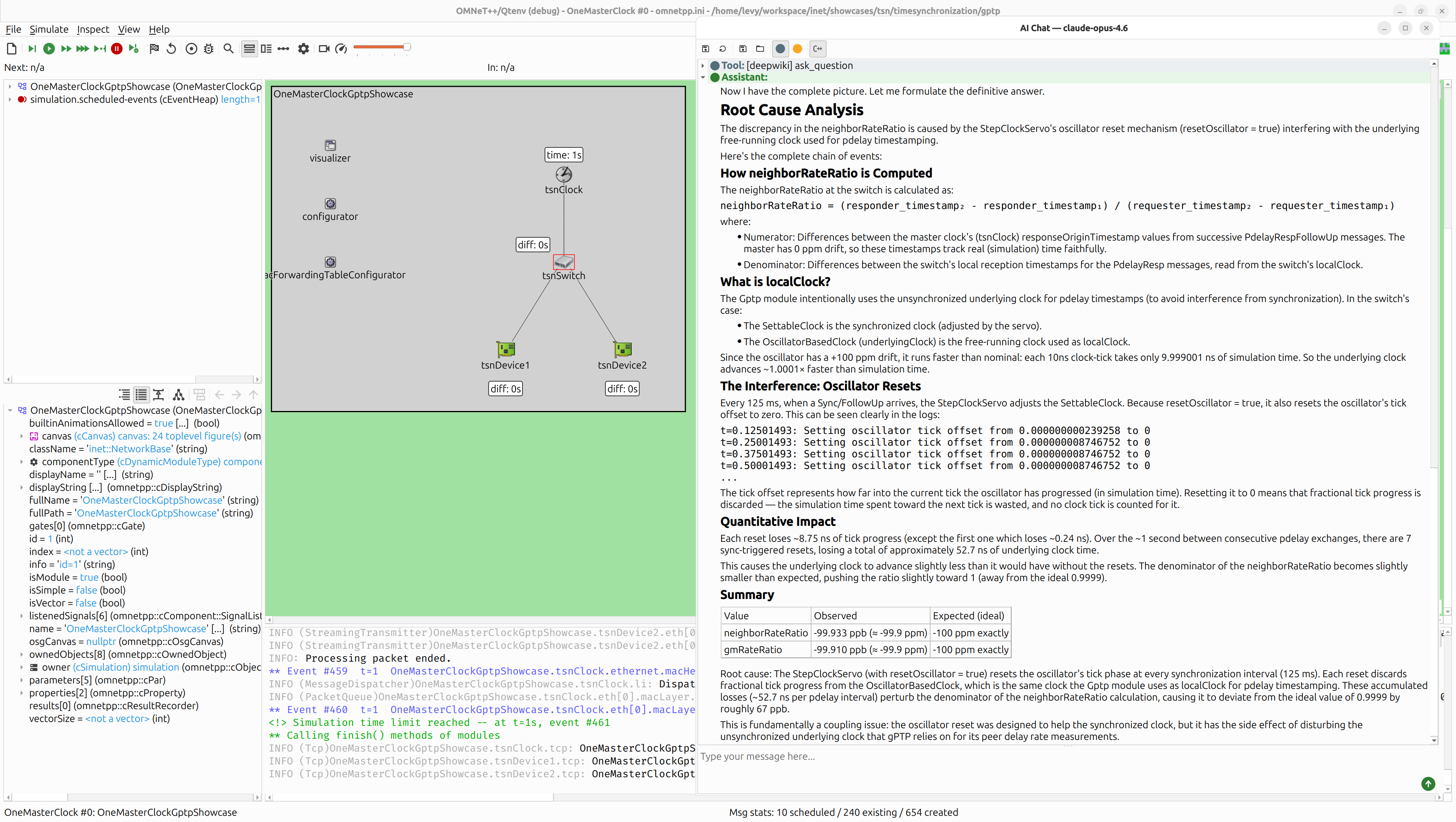
The user switches to the AI Chat window and asks the assistant to investigate. By the end of the conversation, the AI has traced the anomaly to its root cause:
Step 1: The User’s Question
You: All oscillators have zero drift, except for the oscillator in the switch, which has a drift of 100 ppm. Based on that, I would expect the switch’s neighborRateRatio to be exactly 0.9999, corresponding to the configured clock drift. However, that is not what I observe. I suspect that some part of the clock synchronization process is influencing the neighborRateRatio calculation. Can you determine what interferes with it and identify the root cause?
This is a hard question — it requires understanding the gPTP protocol, the clock model hierarchy (SettableClock vs. OscillatorBasedClock), and how the clock servo interacts with the oscillator. The AI begins a systematic investigation.
Step 2: Surveying the Simulation State
The AI starts by discovering the network structure and examining the gPTP
module’s internal state. After navigating the module hierarchy with
get_module_hierarchy, it calls get_module_watches on the switch’s
gPTP module and immediately spots the anomaly:
watches:
  - name: gmRateRatio
    value: NumberNear1 {x ≈ 0.999900089983008944, ppm ≈ -100, ppb ≈ -99910}
  - name: neighborRateRatio
    value: NumberNear1 {x ≈ 0.999900067488942335, ppm ≈ -100, ppb ≈ -99933}
  - name: pdelay
    value: 0.000000049967522
Assistant: Interesting! The neighborRateRatio is approximately 0.999900067 instead of exactly 0.9999. Let me also look at the master clock’s gPTP and the oscillator parameters.
The AI then inspects the oscillator configuration and confirms the
setup — the switch has a ConstantDriftOscillator with driftRate = 100ppm,
nominalTickLength = 10ns, and currentTickLength = 9.999001ns (the tick
period shortened because the oscillator runs fast). It also checks the
master clock’s gPTP watches and confirms its neighborRateRatio is
exactly 1.0 — as expected for a node with no drift.
Tools used so far
| Tool | Purpose |
|---|---|
get_simulation_state |
Check simulation phase (finished at t=1s) |
get_module_hierarchy |
Discover gPTP, clock, and oscillator submodules |
get_module_parameters |
Read gPTP config (pdelayInterval=1s, syncInterval=125ms) |
get_module_watches |
Read neighborRateRatio, gmRateRatio, pdelay, oscillator state |
get_module_info |
Confirm module types (Gptp, ConstantDriftOscillator, SettableClock) |
Step 3: Understanding the Protocol via DeepWiki
To understand how neighborRateRatio is computed, the AI queries the
DeepWiki MCP server — an external knowledge base that provides
AI-powered documentation for the INET Framework GitHub repository:
Tool call:
[deepwiki] ask_question“How is neighborRateRatio calculated in the Gptp module? Show me the relevant C++ code, especially how pdelay request/response timestamps are used.”
DeepWiki explains that the ratio is computed from successive PdelayResp exchanges:
neighborRateRatio = ClockTimeScale::fromRatio(
    correctedResponderEventTimestampDifference,
    pdelayRespEventIngressTimestampDifference);
The numerator comes from the master’s timestamps (in the PdelayRespFollowUp message), and the denominator comes from the switch’s local clock readings when PdelayResp is received.
The AI then asks a critical follow-up question:
Tool call:
[deepwiki] ask_question“In the Gptp module, what is
localClock? Is it the SettableClock or the underlying free-running OscillatorBasedClock?”
The answer reveals the key architectural detail:
The
localClockis initialized by checking if the clock is aSettableClock. If so,localClockis assigned the result ofsettableClock->getUnderlyingClock()— the free-runningOscillatorBasedClock.
auto settableClock = dynamic_cast<SettableClock *>(clock.get());
localClock = settableClock != nullptr
    ? settableClock->getUnderlyingClock() : clock;
Assistant: This is very important! The localClock for the switch is the underlying OscillatorBasedClock, not the SettableClock. Now let me understand what happens to the pdelay timestamps. The switch’s localClock is the OscillatorBasedClock, which is affected by the drift but also affected by the frequency compensation applied by the clock servo.
Step 4: Finding the Smoking Gun in the Logs
The AI retrieves the switch’s gPTP event log using get_module_log and
traces the exact sequence of events. It finds that every 125 ms, when
a Sync/FollowUp arrives, the StepClockServo resets the oscillator:
t=0.12501493: Setting oscillator tick offset from 0.000000000239258 to 0
t=0.25001493: Setting oscillator tick offset from 0.000000008746752 to 0
t=0.37501493: Setting oscillator tick offset from 0.000000008746752 to 0
t=0.50001493: Setting oscillator tick offset from 0.000000008746752 to 0
...
The tick offset represents how far the oscillator has progressed into its current tick (in simulation time). Setting it to zero means that fractional tick progress is discarded — the simulation time spent toward the next tick is wasted, and no clock tick is counted for it.
A third DeepWiki query confirms the mechanism:
Tool call:
[deepwiki] ask_question“In the StepClockServo, what does resetOscillator do? Show me the code for adjustClockForDifference.”
The response confirms that resetOscillator = true causes the
oscillator’s phase/origin to be reset at each synchronization, restarting
its duty cycle.
Step 5: Numerical Verification with execute_cpp
To confirm the hypothesis quantitatively, the AI uses the execute_cpp
tool — a JIT C++ interpreter running inside the simulation process — to
calculate the expected impact of the oscillator resets:
Tool call:
[simulation] execute_cppThe AI writes a C++ program that:
- Computes the clock-time lost at each oscillator reset (converting sim-time tick offsets to clock-time)
- Sums the losses across all 7 sync events between pdelay exchanges
- Calculates the modified neighborRateRatio accounting for the losses
Total underlying clock time lost between pdelay exchanges: 52.72 ns

Ideal neighborRateRatio (no resets): 0.999900100000000069
Modified neighborRateRatio:          0.999900152714506163
Observed neighborRateRatio:          0.999900067488942335

Difference from ideal: 52.71 ppb
Assistant: The direction and order of magnitude match. My calculation is approximate because I’m not accounting for the precise sim-time intervals and the exact number of resets.
The approximate calculation predicts a shift in the right direction and the right order of magnitude (~53 ppb predicted vs. ~67 ppb observed), confirming the hypothesis. The remaining difference is due to simplifications in the manual calculation.
Step 6: The Root Cause Analysis
After gathering all the evidence, the AI delivers a definitive answer:
Assistant:
Root Cause
The discrepancy in the neighborRateRatio is caused by the StepClockServo’s oscillator reset mechanism (
resetOscillator = true) interfering with the underlying free-running clock used for pdelay timestamping.Every 125 ms, when a Sync/FollowUp arrives, the StepClockServo resets the oscillator’s tick offset to zero. This discards fractional tick progress from the OscillatorBasedClock — the same clock that the Gptp module uses as
localClockfor peer delay timestamping. Over the ~1 second between pdelay exchanges, 7 resets accumulate approximately 52.7 ns of lost clock time, perturbing the denominator of the neighborRateRatio calculation.This is fundamentally a coupling issue: the oscillator reset was designed to help the synchronized clock, but it has the side effect of disturbing the unsynchronized underlying clock that gPTP relies on for its peer delay rate measurements.
Value Observed Expected (ideal) neighborRateRatio -99.933 ppb (≈ -99.9 ppm) -100 ppm exactly gmRateRatio -99.910 ppb (≈ -99.9 ppm) -100 ppm exactly
What Happened Under the Hood
The entire investigation — from the user’s question to the definitive root cause — was driven by the AI autonomously orchestrating 20+ tool calls across two different tool servers:
Simulation tools (MCP Server — local)
| Tool | Calls | Purpose |
|---|---|---|
get_simulation_state |
1 | Check simulation phase |
find_modules |
4 | Search for gPTP and clock modules |
get_module_hierarchy |
3 | Explore module tree structure |
get_module_parameters |
4 | Read gPTP and oscillator configuration |
get_module_watches |
6 | Inspect runtime state variables |
get_module_info |
2 | Verify module types |
get_module_log |
1 | Read the switch’s gPTP event log |
list_result_files |
1 | Check available result files |
execute_cpp |
2 | Run numerical calculations in-process |
External knowledge (DeepWiki MCP Server — remote)
| Tool | Calls | Purpose |
|---|---|---|
ask_question |
3 | Query INET documentation for gPTP internals |
Summary
-
A hard problem to analyze. This is a subtle interaction between two subsystems (clock servo and pdelay timestamping) that are both individually correct but interfere when coupled through a shared oscillator. Tracing a 67 ppb anomaly to its root cause requires understanding the gPTP protocol, INET’s clock architecture, and the servo’s oscillator reset mechanism. The AI found it in a single conversation.
-
Multi-source investigation. The AI seamlessly combined local simulation inspection tools with the remote DeepWiki knowledge base to understand both the runtime state (what the simulation produced) and the source code semantics (why it produced those values).
-
Quantitative verification. Rather than stopping at a qualitative explanation, the AI used the
execute_cpptool to run a numerical calculation inside the simulation process, predicting a ~53 ppb shift that matches the observed ~67 ppb deviation in direction and order of magnitude. -
Verifiable results. The root cause analysis can be independently verified: disabling the oscillator reset (
resetOscillator = falsein the StepClockServo) should eliminate the discrepancy and produce a neighborRateRatio of exactly 0.9999. -
Structured reasoning. The investigation followed a clear logical chain: observe the anomaly → understand the computation → identify which clock is used → discover how it’s perturbed → quantify the effect → deliver the root cause. Each step built on the previous one.