AI Chat Showcase: Finding a 3-Way Collision in Aloha
This walkthrough demonstrates the AI Chat Assistant — an LLM-powered chat window inside OMNeT++ Qtenv that can inspect and control a running simulation through natural language. We use the classic Aloha sample to show how a single sentence (“run simulation until 3-way collision”) leads the AI to set a programmable stop condition and find the exact event.
Setup
We start the Aloha sample inside opp_sandbox:
cd samples/aloha
opp_sandbox ./aloha
Note: The
opp_sandboxwrapper runs the simulation inside a lightweight Linux sandbox (using bubblewrap). This is needed because the AI assistant has anexecute_cpptool that JIT-compiles and runs arbitrary C++ code inside the simulation process — extremely powerful, but potentially dangerous on an unprotected system. The sandbox restricts filesystem write access to only the working directory, drops all capabilities, and isolates namespaces, so even if the AI generates harmful code, it cannot affect the host system. The C++ interpreter is automatically disabled when not running inside the sandbox.
After selecting the PureAloha1 configuration in Qtenv, we configure the
LLM provider in Edit → Preferences → AI Chat (the API key, model, and
provider are set here — the same settings can also be provided via
environment variables like ANTHROPIC_API_KEY, but the Preferences dialog
takes priority):
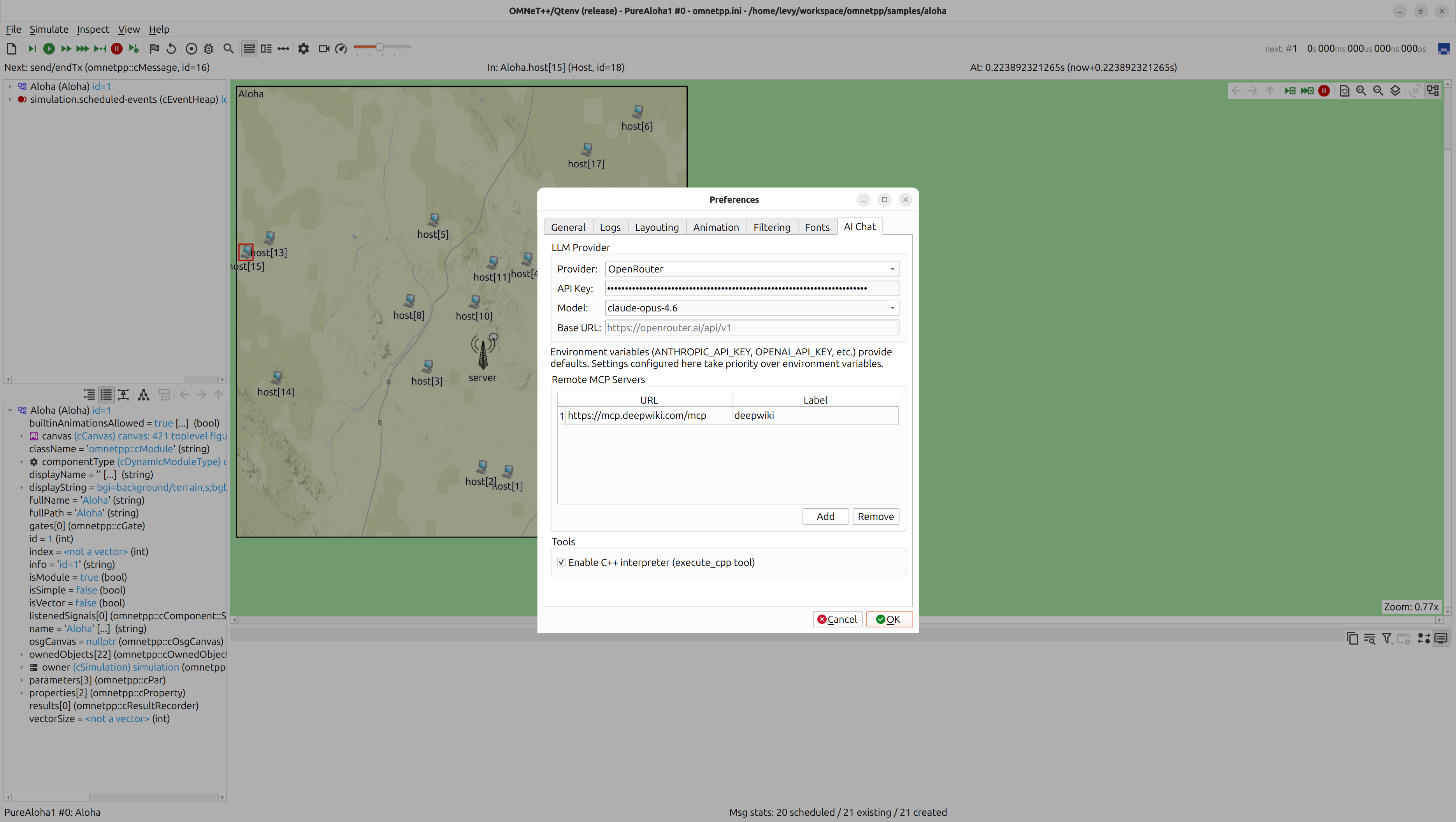
Then we open the chat window from Inspect → AI Chat Assistant and start asking questions.
Note: The results you receive are highly dependent on the LLM provider and model you are using. The results shown in this demo are based on the Claude Opus 4.6 model.
Step 1: “What’s in the simulation?”
We type a simple question:
You: what’s in the simulation?
The AI calls several tools behind the scenes (get_module_info,
get_simulation_state, get_module_parameters, get_canvas_image) to
gather information about the network, and responds with a structured
overview:
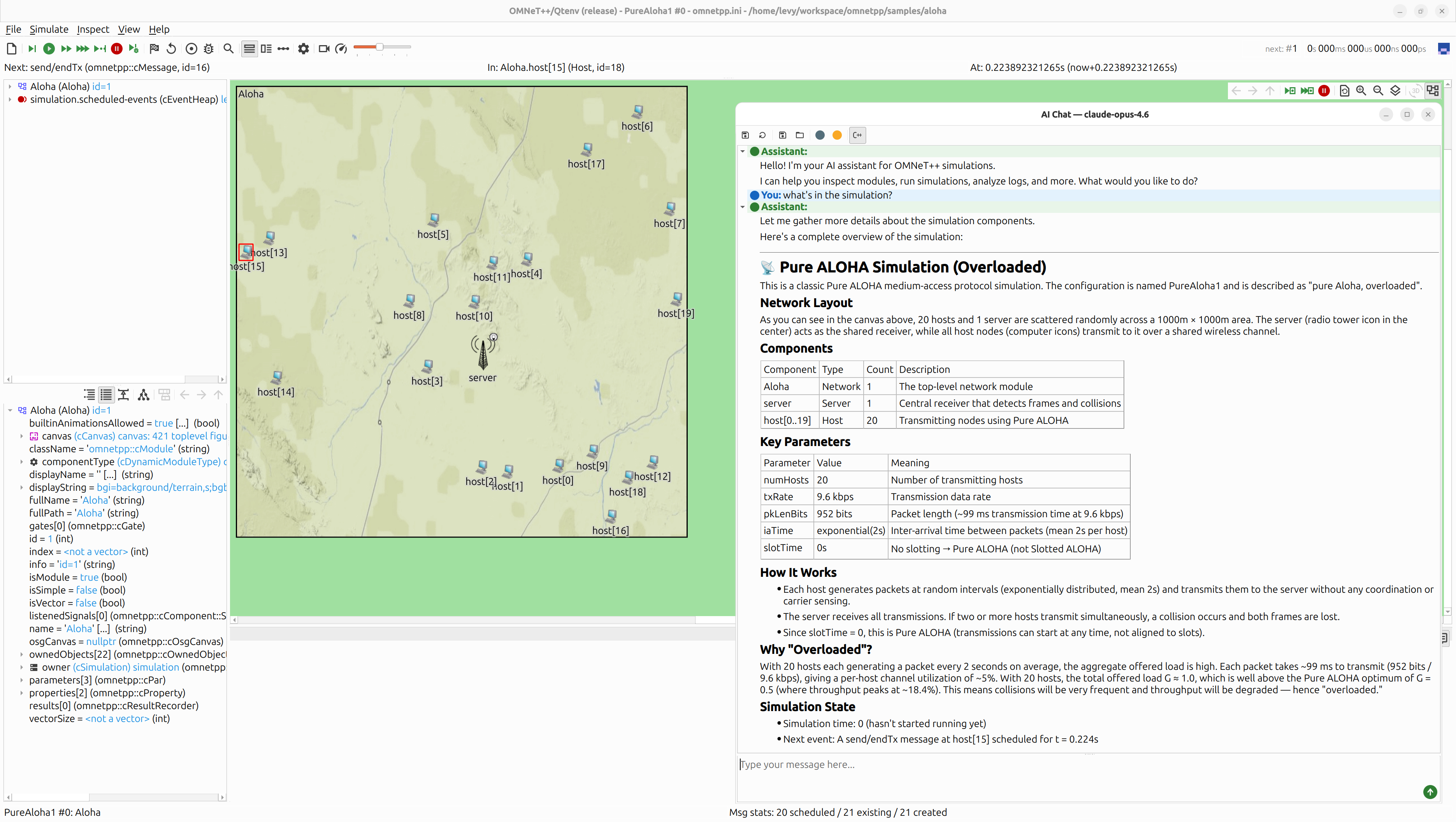
Assistant:
Pure ALOHA Simulation (Overloaded)
This is a classic Pure ALOHA medium-access protocol simulation. The configuration is named PureAloha1 and is described as “pure Aloha, overloaded”.
Component Type Count Description Aloha Network 1 The top-level network module server Server 1 Central receiver that detects frames and collisions host[0..19] Host 20 Transmitting nodes using Pure ALOHA
Parameter Value Meaning numHosts 20 Number of transmitting hosts txRate 9.6 kbps Transmission data rate pkLenBits 952 bits Packet length (~99 ms transmission time at 9.6 kbps) iaTime exponential(2s) Inter-arrival time between packets (mean 2s per host) slotTime 0s No slotting → Pure ALOHA (not Slotted ALOHA) Why “Overloaded”?
With 20 hosts each generating a packet every 2 seconds on average, the total offered load G ≈ 1.0, which is well above the Pure ALOHA optimum of G = 0.5. This means collisions will be very frequent.
The AI already understands the model structure, the protocol, and even explains why this configuration is called “overloaded” — all from inspecting the parameters.
Step 2: “Run simulation until 3-way collision”
Now we ask something more demanding:
You: run simulation until 3-way collision
This is where it gets interesting. The AI cannot simply click “Run” — it needs to figure out how to detect a 3-way collision, write a stop condition, and then run the simulation.
How the AI approaches this
1. Inspect the server’s internal state. The AI first calls
get_module_watches on Aloha.server and discovers a WATCH variable:
watches:
  - name: currentCollisionNumFrames
    className: long
    value: 0
This variable tracks how many frames are involved in the current collision. A 3-way collision means this value reaches 3.
2. Set a programmable stop condition. The AI calls the
set_stop_condition tool with a C++ condition. This is the key mechanism:
the tool accepts the body of a C++ lambda with signature
[](cEvent *event) -> bool { ... }. The simulation evaluates this
condition before each event and stops when it returns true.
The AI writes the following condition:
// Stop condition body — evaluated before each event
auto *server = getSimulation()->getModuleByPath("Aloha.server");
if (!server) return false;
cObject *watch = server->findObject("currentCollisionNumFrames");
if (!watch) return false;
std::string val = watch->str();
return val == "3";
The condition navigates the module tree to find the server, locates the WATCH object by name, reads its string representation, and checks if it equals “3”. This is compiled by the JIT C++ interpreter and installed as a stop condition. Once set, the condition remains active — if the simulation stops and the user presses Run again, the condition will trigger again at the next 3-way collision.
3. Run the simulation. With the stop condition in place, the AI calls
run_simulation with no time or event limit — the simulation runs freely
until the condition triggers.
4. Verify and report. After the simulation stops, the AI calls
get_module_watches to confirm the value is 3, get_module_log to read
the server’s event log, and get_canvas_image to capture the visual state.
The result
Assistant:
3-Way Collision Detected at t = 0.3095s (Event #6)
The server’s
currentCollisionNumFramesis now 3, confirming the 3-way collision. The canvas shows three overlapping transmission rings converging on the server.
Event Time What happened #2 t = 0.2239s host[18] starts transmitting → server: “started receiving” #4 t = 0.2518s host[9] starts transmitting → “collision!” (2-way) #6 t = 0.3095s host[13] starts transmitting → “collision!” (3-way) This happened very early in the simulation (just ~0.3s in), which is expected given the “overloaded” configuration with an aggregate offered load of G ≈ 1.0.
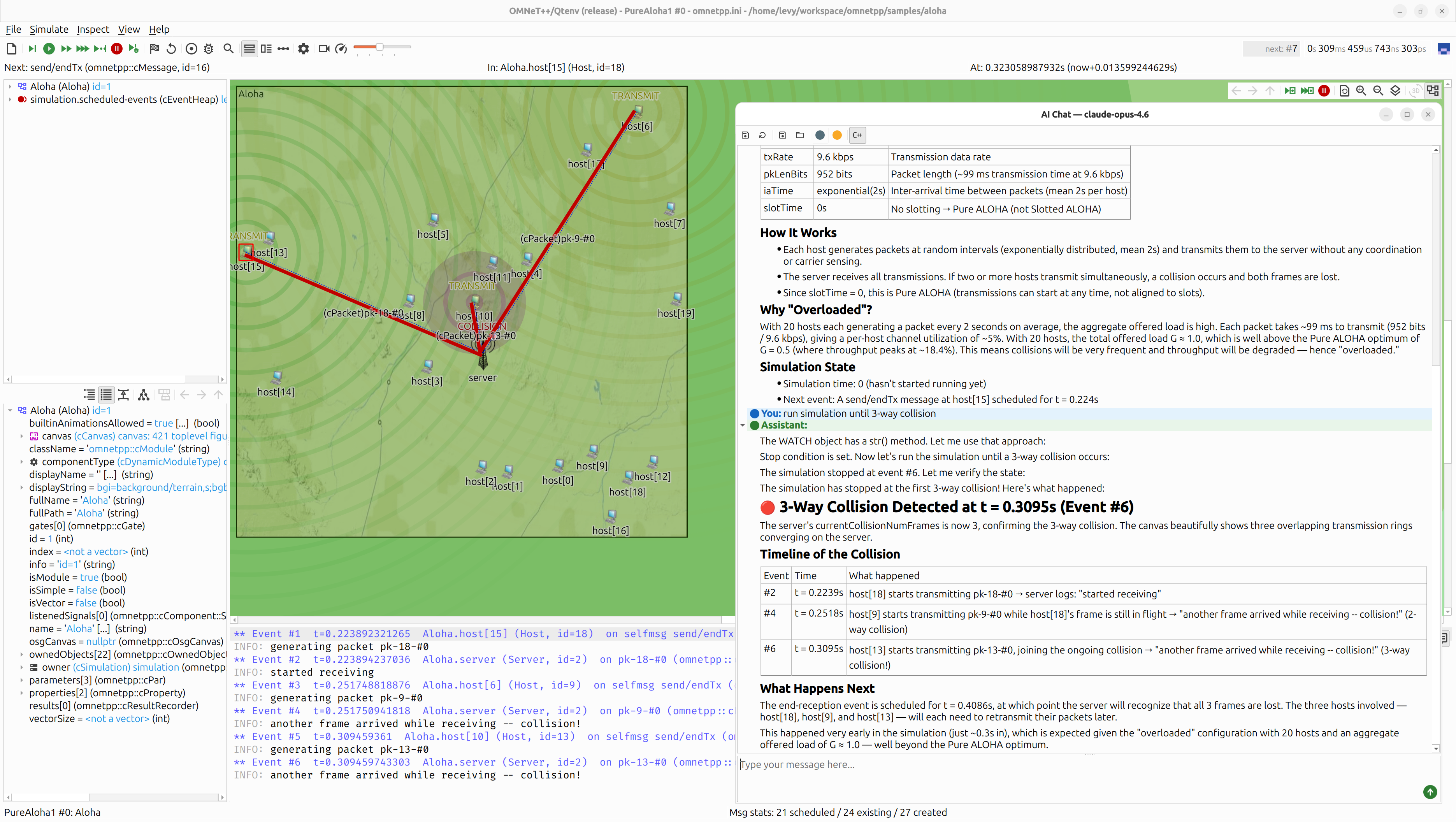
Notice that the simulation stopped at the exact moment when the wavefront
of the third signal (from host[13]) reached the server — you can see three
transmission rings converging on the server in the screenshot, with the
third one just arriving. This is because the stop condition is evaluated
before each event, so the simulation halts right at Event #6 where the
server detects the third overlapping frame and increments
currentCollisionNumFrames to 3.
The detailed timeline with event numbers, exact timestamps, and which hosts were involved was also extracted automatically — the AI read the server’s event log, identified the relevant entries, and presented them in the table above. No manual log searching required.
What just happened under the hood
The entire interaction — from “run simulation until 3-way collision” to the detailed collision report — was driven by the AI making tool calls autonomously:
get_module_watches— discover observable stateset_stop_condition— install a JIT-compiled C++ conditionrun_simulation— advance the simulation until the condition triggersget_module_watches— verify the stop condition fired correctlyget_module_log— retrieve the event log for the timelineget_canvas_image— capture the visual state
The user typed one sentence. The AI figured out what to look for, how to detect it in C++, and presented the results with a clear timeline.
Summary
- Natural language control. You describe what you want (“run until 3-way collision”), not how to get there. The AI translates intent into tool calls.
- Programmable stop conditions. The
set_stop_conditiontool accepts arbitrary C++ code that runs inside the simulation process. The AI writes this code for you based on your description. - Rich context. The AI combines multiple tools (topology, parameters, logs, canvas images, watches) to build a complete picture and present it clearly.
- Tool visibility. Click the Tools button in the toolbar to see or hide the individual tool calls. Visible mode is great for understanding what the AI is doing; hidden mode gives a clean chat experience.